Constructionism and Makers Empire

Papert’s theory of constructionism is based on the theoretical basis for making, which is a stance toward learning that is predicated on the active construction of a shareable artefact. Not to be confused with the linguistically similar theory of constructivism, the theory of constructionism sees leaners move from passive receivers of knowledge, to real world makers and promotes creativity, tinkering, exploring, building and presentation in the learning process (Martinez & Stager 2014, Donaldson 2014). To bring this theory to life in the classroom, teachers can integrate a makerspace into their classroom. Sheridan et al (2014) describe makerspaces as “informal sites for creative production in art, science, and engineering where people of all ages blend digital and physical technologies to explore ideas, learn technical skills and create new products”. These spaces are particularly useful for STEM subjects and allow for students to work with their hands and create something via woodworking, metalworking, robotics and a number of other methods.

Jamie Leben’s Ted talk on Makerspaces provides an overview of the concept – Retrieved from Tedx Talks

Donaldson (2014) highlights the fact that the creations born from a makerspace do not necessarily have to be a physical objects. Published digital portfolios are one example of a non-physical creation, where students upload their digital creations and explain to the reader their thought process behind the creation. This allows for deeper understanding of the learning material, strengthening of student metacognitive processes, and opportunities for students to give feedback to one another. 

Makers Empire

Makers Empire is a 3D design tool that educators can use in their maker spaces. This tool allows students to design objects in 3D that can then be printed using a 3D printer. This technology is effective in helping develop STEM, design thinking and 21st century capabilities for K-8 students (Bower et al 2018). It is accessible on computers, tablets and phones.
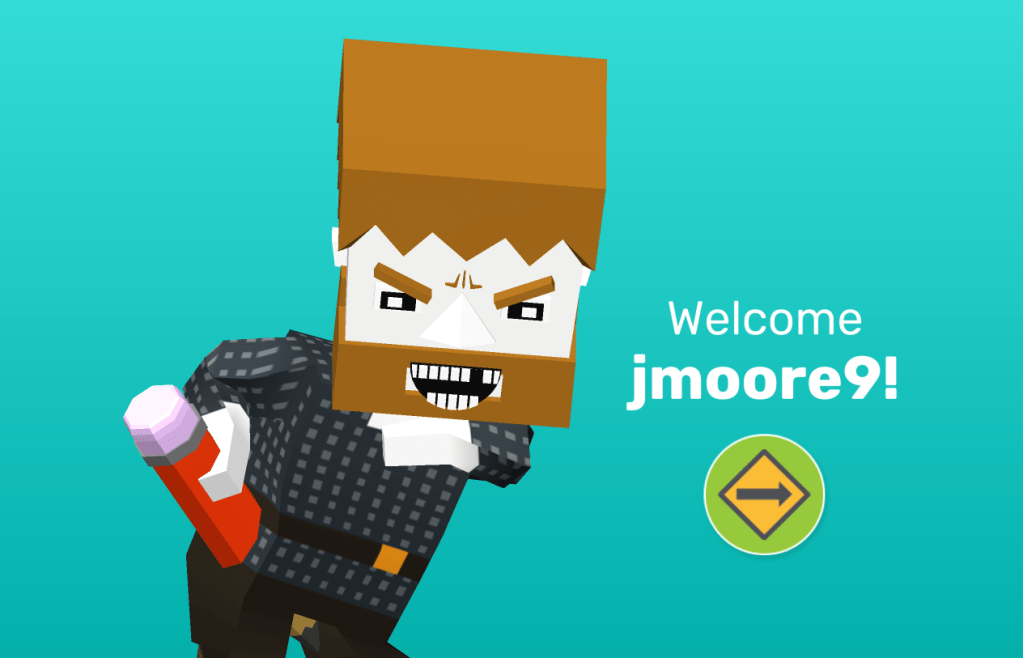
My Avatar in Makers Empire

Whilst particularly useful in STEM subjects, Makers Empire can still lend itself to other subjects, such as history, and foster student creativity. For example, students can use Makers Empire to help recreate ancient artefacts and symbols that can then be printed and examined by the student. An example 3D designed artefact is pictured below. Whilst Makers Empire creates a number of opportunities for learning in the K-8 range, its uses become limited when being used for upper secondary students.
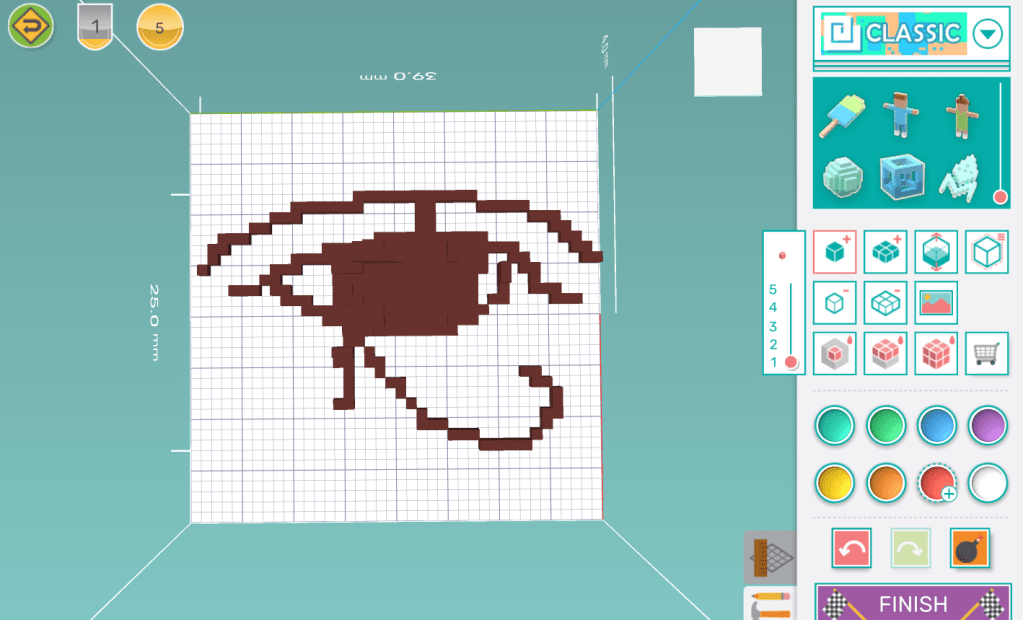
An 3D version of the Egyptian hieroglyph, The Eye of Ra, made in Maker Space

References:

  • Bower, M., Stevenson, M., Falloon, G., Forbes, A., & Hatzigianni, M. (2018). Makerspaces in primary school settings: advancing 21st century and STEM capabilities using 3D design and printing. 
  • Donaldson, J. (2014). The Maker Movement and the rebirth of Constructionism. Hybrid Pedagogy. 
  • Martinez, S., & Stager, G. (2014). The maker movement: A learning revolution. Learning & Leading with Technology
  • Sheridan, K., Halverson, E., Litts, B., Brahms, L., Jacobs-Priebe, L., & Owens, T. (2014). Learning in the Making: A Comparative Case Study of Three Makerspaces. Harvard Educational Review, 84(4), 505-531.
Games and Learning – Scratch and Sid Meir’s Civilisation

Many of today’s youth spend more time playing video games than interacting with more traditional forms of media such as television, film and books (Squire 2006).  When used correctly, video games are powerful tools that educators can adapt into their classroom practise and pedagogy to deliver meaningful and engaging learning experiences for students. In order to achieve this, teachers must play an active role in the planning, realising and assessing of games-based learning processes (Kangas, Koskinen & Krokfors 2017). Teachers can make use of both games specifically made for educational purposes, as well as traditional games made for entertainments purposes in the classroom. 

Retrieved from unsplash.com

Scratch

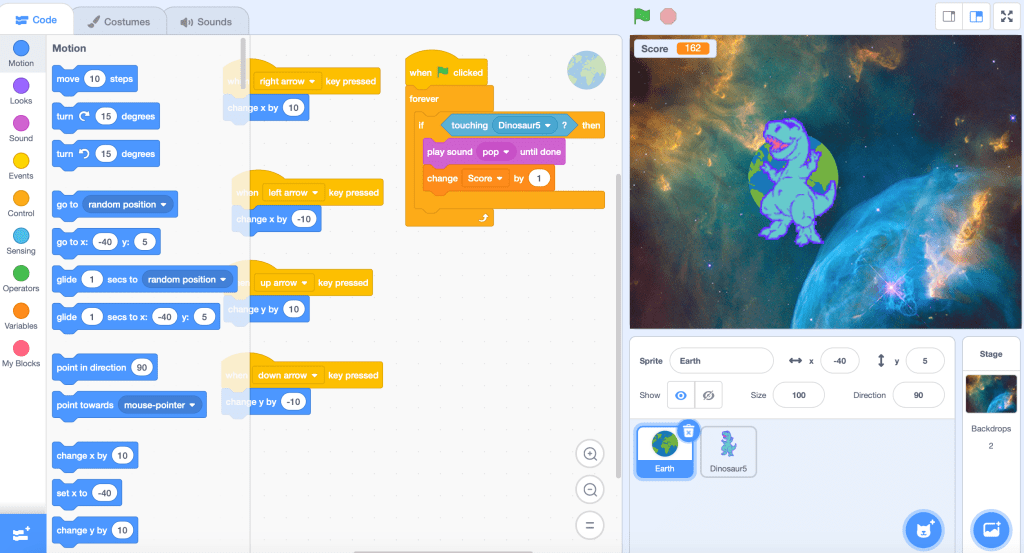
Scratch is an online coding tool developed by MIT that can be used by students to code their own games and animations. In the process of doing so, students are able to develop their computational thinking skills, problem solving skills and coding skills (Ke 2014). Scratch provides students with a number of tutorials that helps develops the necessary skills to develop simple games. Once equipped with these skills, students are able to create their own games subjects that can be applied to a range of different subjects such as math, science, history and English.

An example of a simple game made in Scratch

Sid Meir’s Civilisation

The Civilisation series is a popular and long running series of games that see players act as the leader of a civilisation who progressively grows their empire through a variety of different means such as warfare, diplomacy and science. Whilst it was designed for entertainment purposes, teachers’ can make good use of this game to teach historical concepts and events in a fun and engaging way for students, whilst also achieving meaningful learning outcomes. In research on using videogames as designed experience, Squire (2006) details a Year 9 class playing Civilisation III and learning about geographical conditions impacting global trade networks, access to resources, and opportunities for population expansion, with one student remarking that “geography and gold determine how history plays out”.

Sid Meir talking about Civilisation and watching history play out in the game

References

  • Kangas, M., Koskinen, A., & Krokfors, L. (2017). A qualitative literature review of educational games in the classroom: the teacher’s pedagogical activities. Teachers and Teaching, 23(4), 451-470
  • Ke, F. (2014). An Implementation of Design-Based Learning Through Creating Educational Computer Games: A Case Study on Mathematics Learning During Design and Computing, Computers & Education, 73, 26-39.
  • Ke, F. (2014). An Implementation of Design-Based Learning Through Creating Educational Computer Games: A Case Study on Mathematics Learning During Design and Computing, Computers & Education, 73, 26-39.

Virtual Reality – Oculus Rift, Google Cardboard and CoSpaces

Virtual Reality is a powerful and immersive technology that is beginning to become more prevalent in classrooms across the world and has the potential for some truly astonishing learning outcomes. Virtual Reality can transport students to completely new worlds of their own creation, put them in the shoes of astronauts in space or send them back in time to when dinosaurs ruled the world. The possibilities are truly endless.

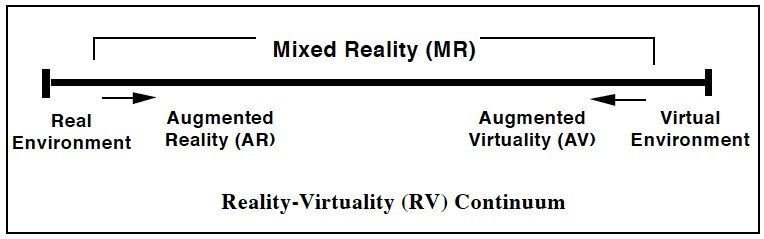
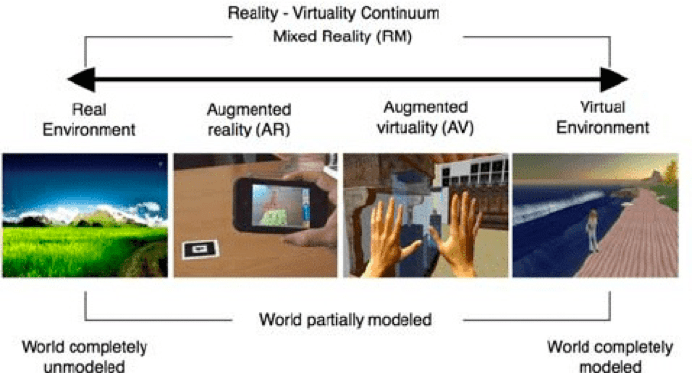
Immersive Virtual Reality (IVR) sits on the furthest end of Milgram’s Reality-Virtuality Continuum (pictured below). In this context, immersion refers to the subjective impressions that one is participating in a realistic experience (Dede 2009). IVR differs to standard desktop virtual reality, as there is no ‘reality check’ where you can real life surroundings outside the screen. When using IVR you are literally surrounded by the virtual environment no matter where you look (Southgate 2018). This has significant implications for education and allows for students to adopt multiple perspectives, engage in situated learning and transfer knowledge (Dede 2009).

Milgram’s Reality-Virtuality Continuum. Retrieved from researchgate.net

How VR can be used in the classroom

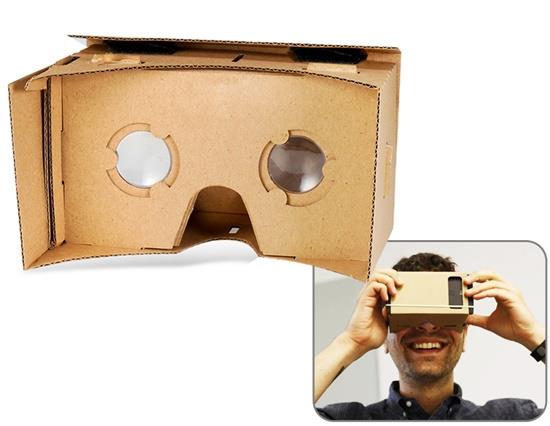
Google Cardboard. Retrieved from geekbuying.com

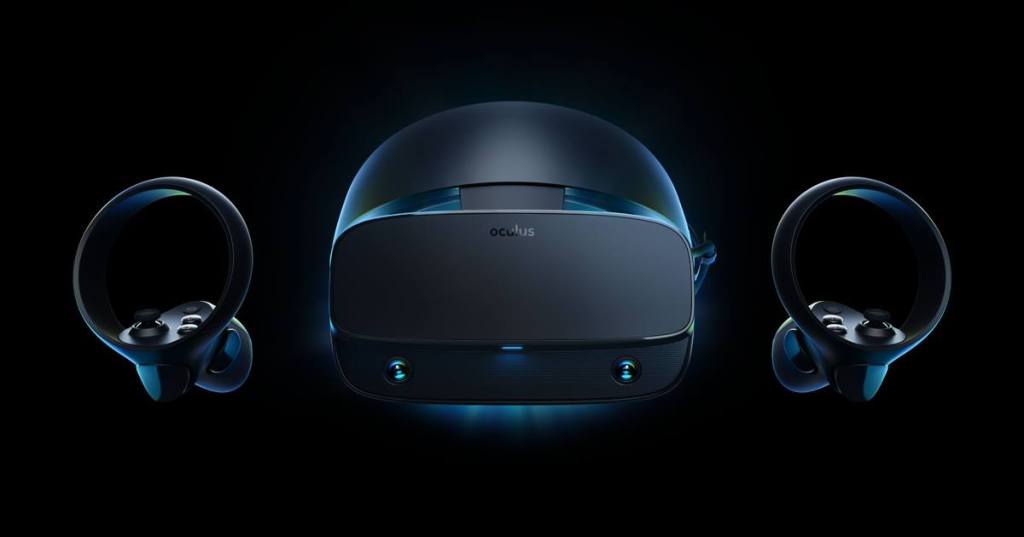
VR can be used in a number of different ways, with the most immersion coming from the use of head mounted displays (HMDs). HMDs can vary widely in their cost. Higher end HMDs include the Oculus Rift S, which comes with two controllers, one for each hand that the participant uses to interact with the virtual world. This creates an extremely immersive experience, however it comes at a high cost of $649 per unit, which can be a significant barrier for entry for schools. Luckily, there are cheaper alternatives such as Google Cardboard, where students need only to insert their phone to have an immersive VR experience. Whatever method is chosen some safety considerations should be noted, such as primary school children believing that IVR experience were real events, students getting motion sickness and students hurting themselves by falling over or bumping into something in the physical environment.

The Oculus Rift S with Oculus Touch Controllers. Retrieved via oculus.com

CoSpaces is a tool educators can use to help foster creativity through VR. In CoSpaces, students have the ability to create and share their own virtual world. This can be done through importing backgrounds and objects from the CoSpace library or by importing their own environment in the form of a 360 degree image. This is a good tool for both primary and secondary age students, with worlds being able to be created through simple drag and dropping of objects, all the way through to the coding of animations.  

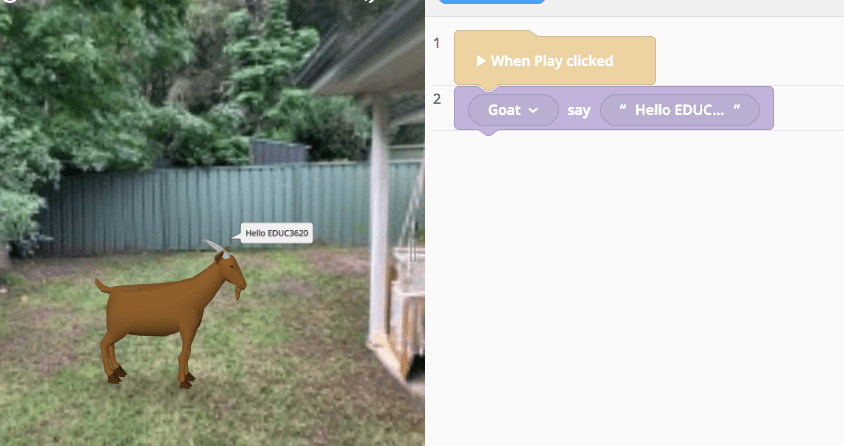
A screenshot from CoSpaces. The background is a 360 degree photo of my back yard.

References:

  • Dede, Chris. (2009). Immersive interfaces for engagement and learning.(PERSPECTIVE)(Author abstract)(Essay). Science, 323(5910), 66-69.
  • Southgate, E. (2018). Immersive virtual reality, children and school education: A literature review for teachers. 

Augmented Reality – Zapworks

Augmented reality can be defined as technology that allows for virtual objects to be layered over the top of real world environments. It also allows for interaction to occur with the virtual objects. (Bower et al 2014). AR has become more common in the world today, partly due to the advancement and mass adoption of mobile technology, lowering the barrier to entry. Some mainstream examples of AR technology include the use of filters on social media platforms such as Instagram and Snapchat. Another example was the massively, although briefly, popular video game Pokemon Go which saw people using their phone cameras to capture ‘wild pokemon’.

Augmented Reality is often compared and confused with Virtual Reality. Whilst there are similarities between the two, there are some fundamental differences. These can be identified using Milgram’s Reality-Virtuality Continuum (pictured below).  Augmented Reality can be viewed as ‘mixed reality’ where virtual elements are blended with the real environment, whereas VR makes use of a fully virtual environment.

Milgram’s Reality-Virtuality Continuum. Retrieved from researchgate.net

Augmented Reality has a number of applications for use in education and can be used by teachers to support pedagogies such as constructivist learning, games-based learning, enquiry-based learning and situated learning among others (Bower et al 2014). AR also has become much more accessible due to the rise of mobile technology. Despite its potential, AR does have a number of limitations and drawbacks that should be noted. These include students and teachers finding AR complicated to use, technical issues and overemphasis on lower order thinking  (Akçayır & Akçayır 2016). To help combat these issues, teachers must have a strong understanding of the technology, as well as the outcomes they want students to achieve, in order for AR to be successfully used in the classroom.

Zapworks – Make your own AR content!

A trigger image I made of The Parthenon and Acropolis in Greece. Using the Zapcode will bring up a video detailing the famous site!

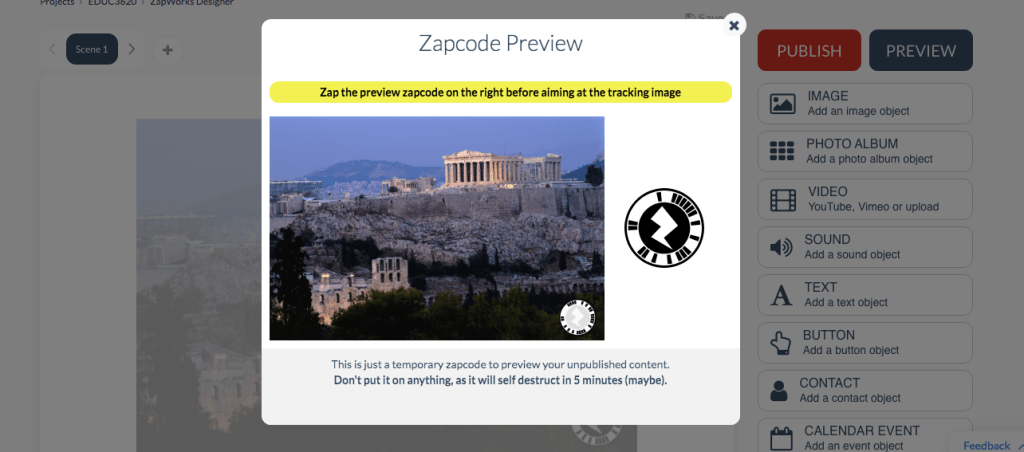
Zapworks is an AR tool that educators can use to create their own AR content. Educators can add a ‘Zapcode’ to a ‘trigger image’ that students can scan using the Zappar app. The Zapcode can add content such as images, videos, sounds, text etc. This adds another layer of engagement in classroom activities by differentiating the content that students are learning from. It also allows for students to be creative by making their own interactive content that they can then share with their peers. As with all use of technology in the classroom, especially mobile technology, care must be taken to ensure that students remain on task and do not become distracted.

Screenshot from the Zapworks website showing the making of my Zapcode!

References:

  • Akçayır, Murat, & Akçayır, Gökçe. (2017). Advantages and challenges associated with augmented reality for education: A systematic review of the literature. Educational Research Review, 20, 1-11.
  • Bower, M., Howe, C., Mccredie, N., Robinson, A., & Grover, D. (2014). Augmented Reality in education – cases, places and potentials. Educational Media International, 51(1), 1-15.
  • Carmigniani, J., & Furht, B. (2011). Augmented Reality: An Overview. In Handbook of Augmented Reality (1st ed., pp. 3-46). New York, NY: Springer New York.

Robotics – Ozobot

When we think of robots, many people’s thoughts go straight to the generic Hollywood interpretation of a mechanical humanoid that is programmed to be the slave of its human master. While not entirely true, robots are indeed machines that are programmed to carry out complex tasks automatically and while they can be designed to look human-like in their appearance, there is no defined appearance for them.

Robots are becoming increasingly engrained in many different fields, one of which being education. As per the Melbourne declaration, Young Australians are required to be creative and productive users of technology and play an active role in their own learning. Robots can be used to achieve these goals. Using a constructivist approach to learning, robots can be used as learning tools in the classroom to enable students to work on experiments, problem solve, have opportunities for reflection and collaborate as a team (Alimisis 2012). Through robotics, students are able to experience and discover things for themselves, becoming co-constructors of their learning, rather than merely passive receivers of knowledge and technology (Atmatzidou & Demitriadis 2016; Jung & Wong 2018). This approach to learning coupled with the use of robots is a great way for teachers to promote creativity within their classroom.

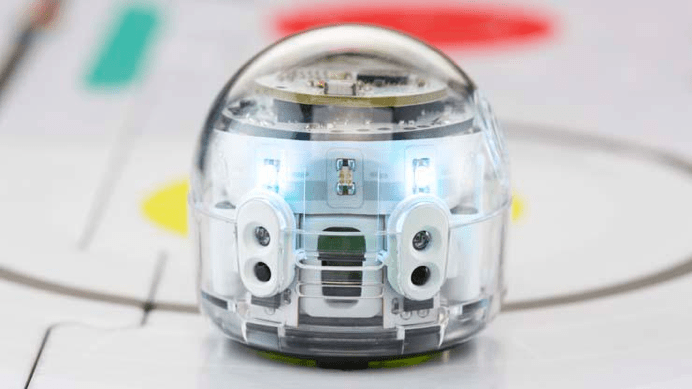
The Ozobot. Retrieved from https://www.kidnetic.co/product.ozobot

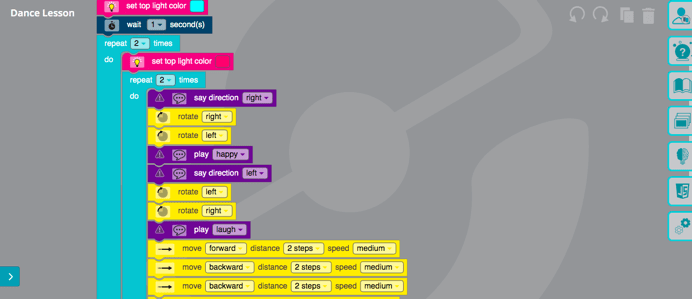
Ozobot is an educational robot that can be used to help students engage in constructivist learning in the classroom. Students program the Ozobot using ozoblockly, which is based on Google’s Blockly programming tool, to perform a number of different functions, ranging from simple tasks such as moving left and right, to more complicated functions such as making it dance and change colour.

A screenshot of blockly code used to make Ozobot dance!

The Ozobot is an effective learning tool as not only does it help students develop their ICT skills, it also helps develop their computational thinking skills, engage in problem-based learning with a tangible result attached, creatively come up with solutions and work collaboratively in the classroom. An example of how the Ozobot could be used creatively in the classroom is by attaching a pencil to the Ozobot and programming its path to draw a picture.

Some drawbacks of the Ozobot is that it may not be sufficiently challenging for senior students in secondary school settings. It also requires explicit instruction and direction in order to get students skilled enough to use it to its full potential.

References:

  • Alimisis, Dimitris (2012). Robotics in Education & Education in Robotics: Shifting Focus from Technology to Pedagogy. Robotics in Education Conference, 2012
  • Jung, S., & Won, E. S. (2018). Systematic review of research trends in robotics education for young children. Sustainability, 10(4), 905
  • Atmatzidou, S., & Demetriadis, S. (2016). Advancing students’ computational thinking skills through educational robotics: A study on age and gender relevant differences. Robotics and Autonomous Systems, 75(PB), 661-670.

Computational Thinking – Microbit and Code Combat

What is Computational Thinking?

When hearing the words computational thinking, it would not be strange for someone to think that they refer to the way computers work, or perhaps may think of them as referring to programming languages. However, these are only small parts of what we mean by computational thinking. NESA defines computational thinking as the thought process involved in formulating a problem and expressing its solution(s) in such a way that a computer – human or machine – can effectively carry it out. Adding on to this, Wing (2006) states that computational thinking is a way humans can solve problems, not simply a way computers calculate, as humans are smarter and more imaginative than computers. Whilst having its roots in computer science, computational thinking can be used to aid in the teaching of a number of different disciplines including mathematics, science, language and programming (Hsu, Chang & Hung 2018).

How can Computational Thinking be used in the classroom?

The process of computational thinking can be broken down into the following stages:

  • Decomposition
  • Data Analysis
  • Abstraction
  • Algorithm Design
  • Transferring

Following these steps can be done so in conjunction with a number of different learning tools to help develop not only computational thinking, but also student creativity.

Learning Tools

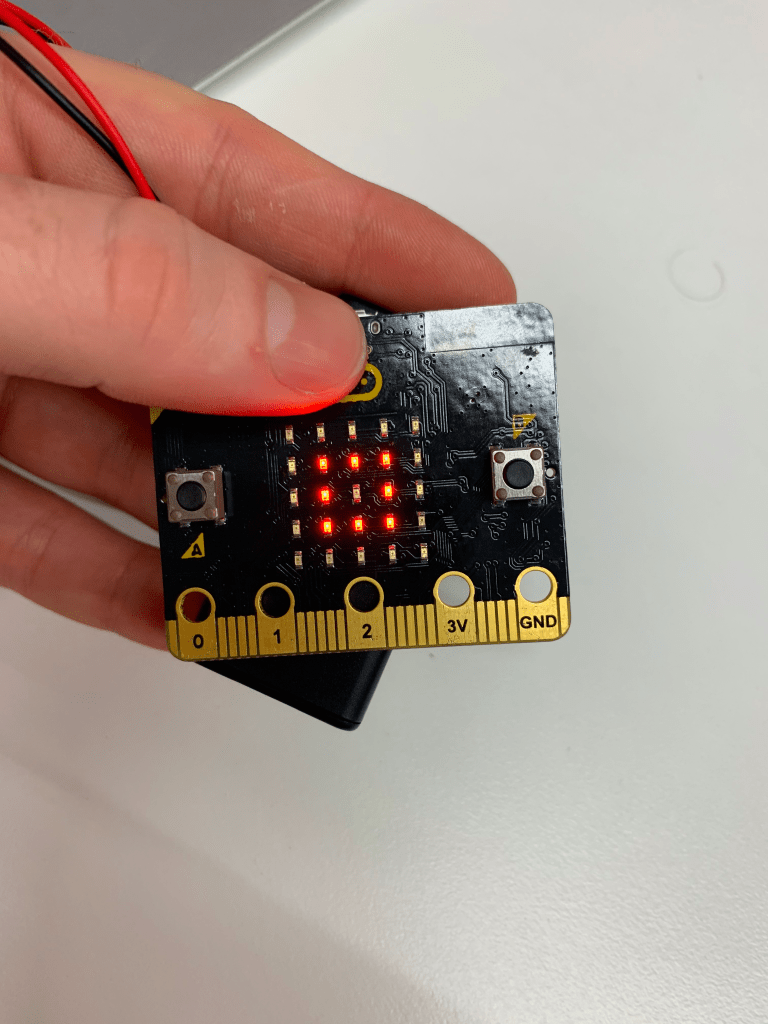
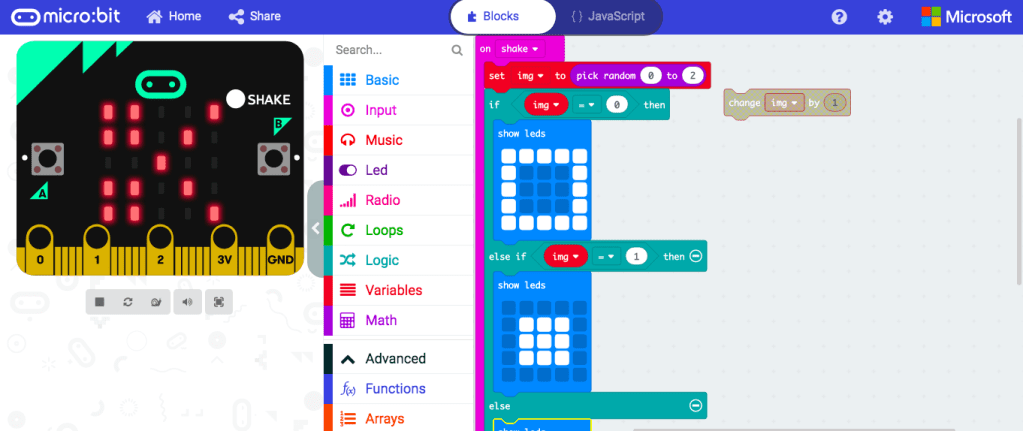
Microbit is a physical computing device that is equipped with a number of physical features such as LED lights, buttons and and a USB connector. Students can program the Microbit to perform a number of different functions using blockly, a type of programming language that is assembled using ‘blocks’ of code. This does not require a strong knowledge of coding, however, students must follow the computational thinking process in order to create their desired functions on the Microbit. Microbit can be applied to many different subjects, such as science, where it can be programmed to measure electrical conductivity. It could also be programmed to measure steps taken during physical education.

A Microbit used for playing scissors, paper, rock. The lights are displaying the symbol for rock.
A screenshot of blocks of code used to run the above game of scissors, paper, rock

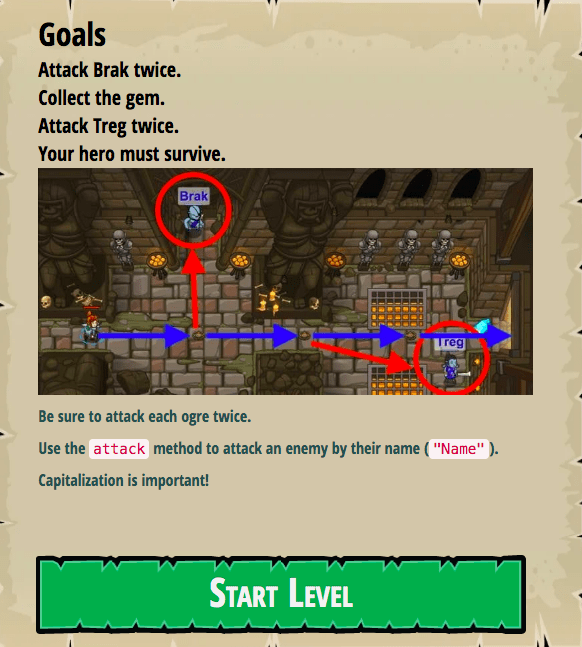
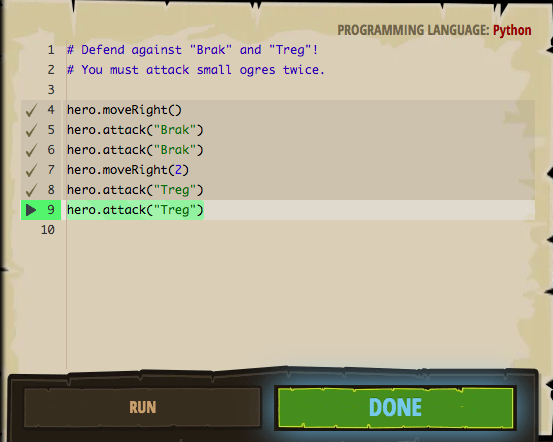
Code Combat is another learning tool that can help develop CT skills through game based learning. Code Combat is a video game where students have to navigate their character through a variety of levels using programming languages such as Python. As students progress through the levels, they are given increasingly complex situations that require them to creatively use the CT skills and coding knowledge they have acquired to complete them.

Screenshot from a level in Code Combat
Screenshot of code used to beat the level pictured above

Using learning tools such as these are important when teaching computational thinking as research has shown that CT skills are best learnt when used to help develop something tangible such as an animation or a game and especially when they are allowed to do so creatively (Lee, Mauriello & Bederson 2014).

References

  • Hsu, T. C., Chang, S. C., & Hung, Y. T. (2018). How to learn and how to teach computational thinking: Suggestions based on a review of the literature. Computers & Education, 126, 296-310.
  • Lee, T., Mauriello, M., Ahn, J., & Bederson, B. (2014). CTArcade: Computational thinking with games in school age children. International Journal of Child-Computer Interaction, 2(1), 26-33.
  • Turchi, T., Fogli, D., & Malizia, A. (2019). Fostering computational thinking through collaborative game-based learning. Multimedia Tools and Applications, 78(10), 13649-13673.
  • Wing, J. M. (2006). Computational thinking. Communications of the ACM49(3), 33-35.

Design Thinking and 3D Printing

Design Thinking – What is it?

There are many different things we must consider when are talking about design thinking. Broadly speaking, it involves taking a design approach to real world problems (Koh et al 2015). Design thinking involves using creativity and a following a process to transform difficult challenges into opportunities for design. Design Thinking provides opportunities for collaboration amongst peers and encourages experimentation whilst not discouraging one from making mistakes (IDEO 2012).

There is an increased focus on design thinking around the world due to the perception that it is the key to addressing a number of different social, economic, technological and political issues (Koh et al 2015). This focus will become increasingly apparent as the trend of basic jobs and skills being automated continues, highlighting the increasing need from the economy for higher order thinking skills, as well as creativity and critical thinking. Governments around the world are already looking to design thinking as a means to solve national issues, as seen with South Korea, China and India promoting design thinking programmes within their universities (Koh et al 2015).

Using 3D printing to promote Design Thinking

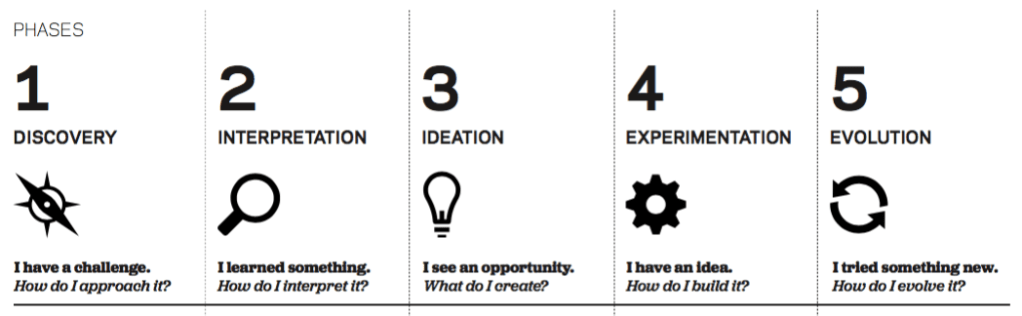
One way we can incorporate design thinking in the classroom is through the use of 3D printing whilst following the design process as set by IDEO (2012) (Pictured below). 3D design and printing are powerful tools that enable students to make quick design decisions without sacrificing accuracy or quality (Greenhalgh 2015). 3D design and printing has a large number of potential applications across multiple different disciplines. This includes, but is not limited to;

Mathematics – Geometry, visualising mathematic models
Science – Modeling cells, DNA, planetary systems
Business Studies – Creating a logo for a business
TAS – Designing furniture such as cupboards, shelves, chairs etc

Design Process IDEO (2012)

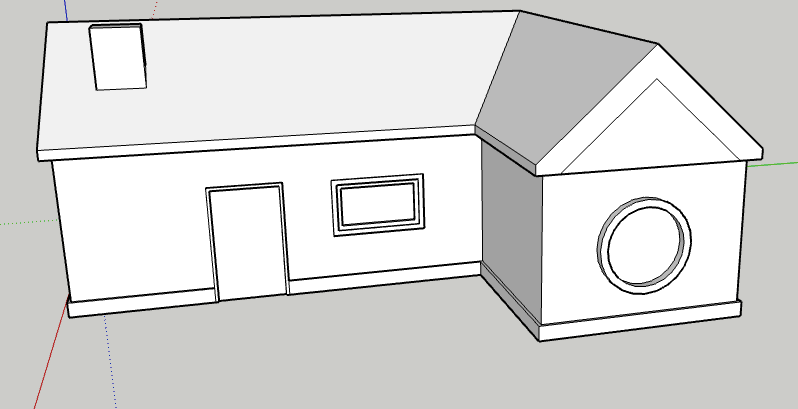
Sketch Up is a 3D modelling software that provides a number of easy to use 3D design tools to create any number of buildings, shapes, furniture, interior designs etc. By using 3D modelling software such as Sketch Up, the design process is sped up significantly compared to physically creating a prototype through traditional physical methods without sacrificing accuracy (Greenhalgh 2015). This is significant when using Sketch Up to foster creativity in the class room as it allows for experimentation that would likely not be feasible using traditional physical design methods due to time restrictions faced in most educational settings.

A simple example I made in Sketch Up of a house

Like with any use of technology within the classroom, the teacher must be knowledgeable on the use of it, in order to effectively facilitate the learning experience (Greenhalgh 2015). It is also worth considering that some school may not have access to a 3D printer for students to print their creation. In spite of this however, Sketch Up and other 3D modelling software are still worthwhile in the classroom to help teach students Design Thinking and foster creativity.

References:

  • Greenhalgh, S. (2016). The effects of 3D printing in design thinking and design education. Journal of Engineering, Design and Technology, 14(4), 752-769.
  • IDEO (2012). Design Thinking for Educators (2nd Edition)
  • Koh, J. H. L., Chai, C. S., Wong, B., & Hong, H. Y. (2015). Design thinking and education. In Design thinking for education (pp. 1-15). Springer, Singapore

Assignment 1 – Learning Technology Critique – Minecraft Education Edition

Minecraft is a ’sandbox’ video game where players can create structures and interact with the world around them by using a variety of different tools, such as a pickaxe for ‘mining’ and by assembling their creations with a number of different textured blocks.

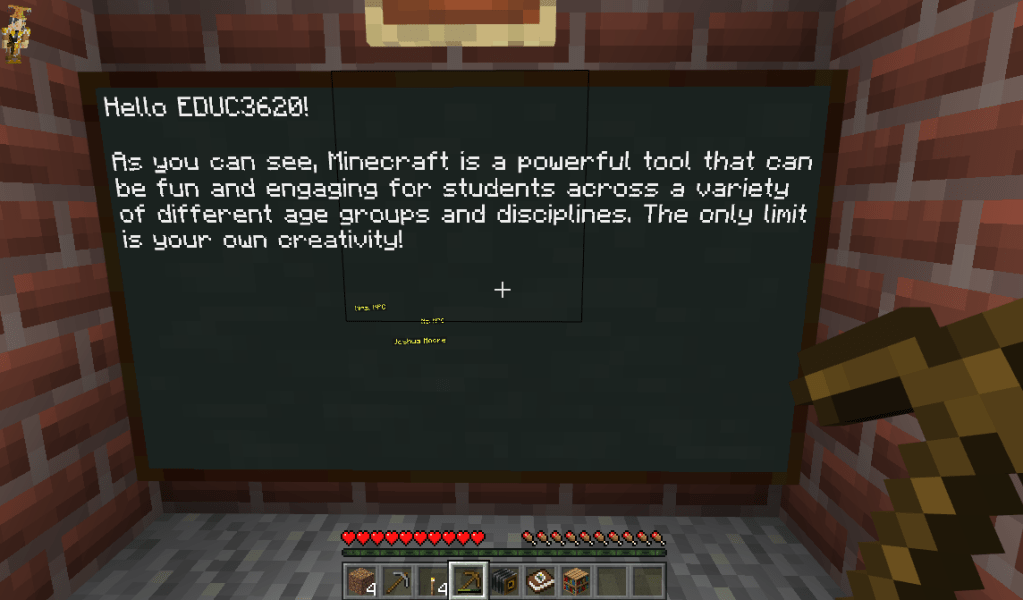
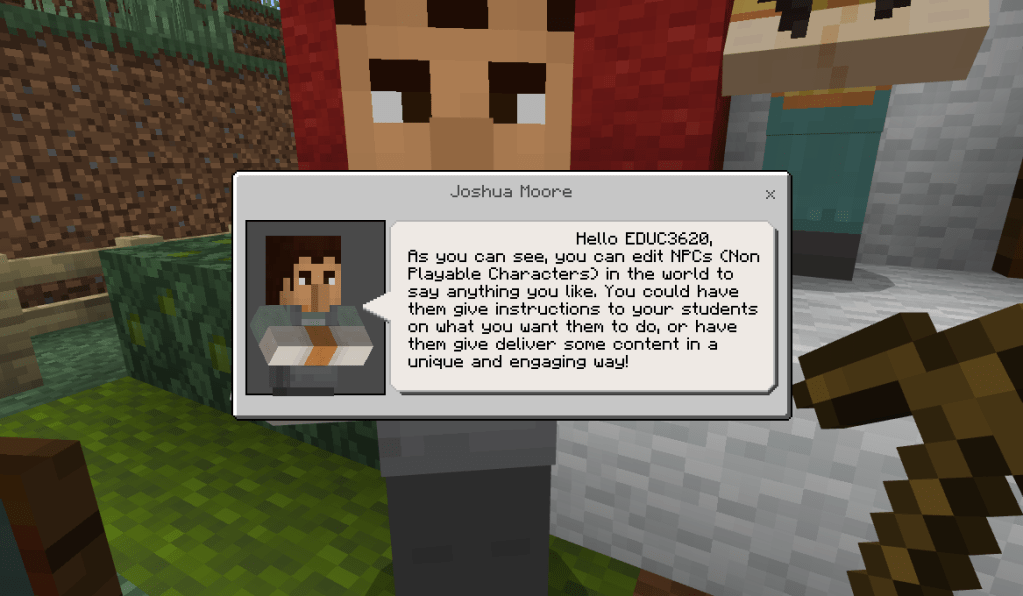
Using boards, teachers can leave instructions or provide students with content within the game

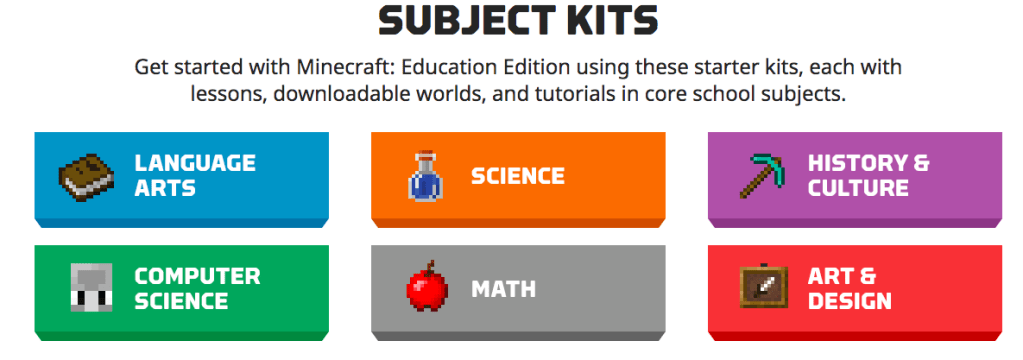
Minecraft can be used as a learning tool across any age group and has a huge variety of uses that can be applied to many different disciplines to help foster creativity with students. Lessons can be downloaded directly from the Minecraft Education Edition website or teachers can create their own lessons through the world builder feature. For example, a science lesson can be given on renewable energy where students are tasked with building their own home that is powered by renewable energy in a number of different biomes. Overby and Jones (2015) found that Minecraft was useful in art classes for developing programming skills digital art as well as encouraging collaboration between students. A key benefit to the use of Minecraft in the classroom is the possibilities it opens up for students to be creative. The game allows students to approach  the tasks given to them in the lessons in any way they see fit, allowing to experiment without fear of failure and come up with their own creations. It is also a fun and engaging way to deliver content to students.

Lessons can be filtered via subject

The game is open ended in nature, which is great for allowing students to be creative, however, some teachers may be apprehensive to engage a class in such an activity, especially if they are unfamiliar with video games or some other aspect of ICT resources (Loveless, Burton & Turvey 2005). Fortunately, the Education Edition of Minecraft comes with a tutorial mode that helps introduce teachers to the game. This is an important feature for teachers to best make use of Minecraft, as it helps illustrate the potential for learning the game has and also helps remove any apprehension a teacher might have when considering using an open ended activity, such as Minecraft, for learning and fostering creativity with students.

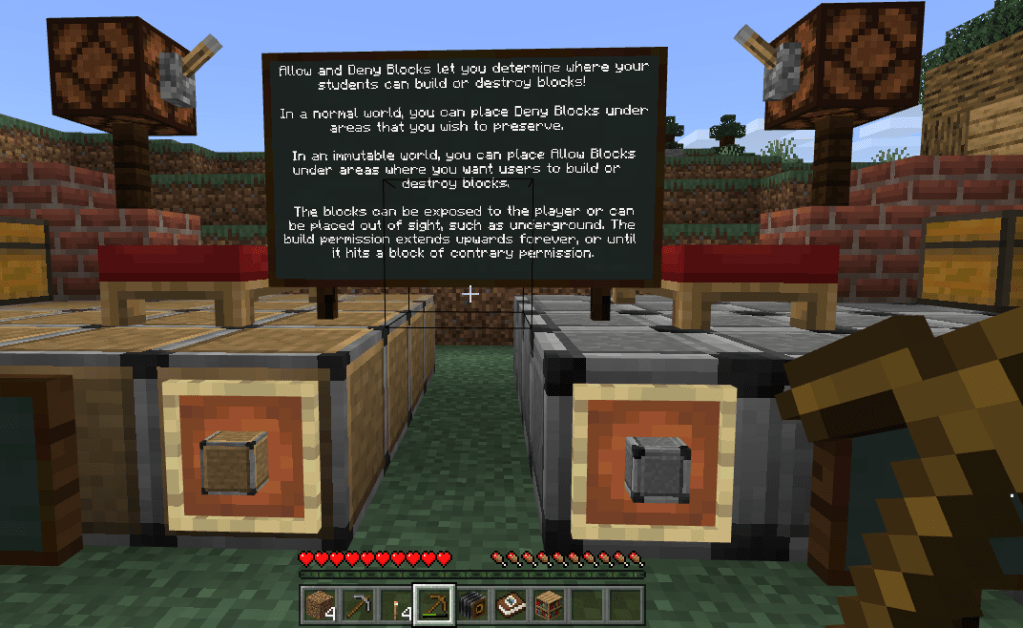
Whilst Minecraft can certainly be a useful tool to encourage creativity in the classroom, the freedom the game allows for can give opportunities for students to get distracted and go off task. The game does have a feature called “allow and deny” blocks (pictured below) that can be used to combat this somewhat, but it is still worth noting the potential for students to go off task. Despite some of the potential issues that come with using a video game as a learning tool, Minecraft should be taken seriously as a legitimate learning tool to help foster creativity.

Allow and Deny blocks can be used to help ‘contain’ students within a set of desired parameters.

References:

  • Overby, A. & Jones, B.L., 2015. Virtual LEGOs: Incorporating Minecraft into the Art Education Curriculum. Art Education, 68(1), pp.21–27.
  • Loveless, A., Burton, J., & Turvey, K. (2006). Developing conceptual frameworks for creativity, ICT and teacher education. Thinking Skills and Creativity, 1(1), 3-13.

Design a site like this with WordPress.com
Get started