When we think of robots, many people’s thoughts go straight to the generic Hollywood interpretation of a mechanical humanoid that is programmed to be the slave of its human master. While not entirely true, robots are indeed machines that are programmed to carry out complex tasks automatically and while they can be designed to look human-like in their appearance, there is no defined appearance for them.
Robots are becoming increasingly engrained in many different fields, one of which being education. As per the Melbourne declaration, Young Australians are required to be creative and productive users of technology and play an active role in their own learning. Robots can be used to achieve these goals. Using a constructivist approach to learning, robots can be used as learning tools in the classroom to enable students to work on experiments, problem solve, have opportunities for reflection and collaborate as a team (Alimisis 2012). Through robotics, students are able to experience and discover things for themselves, becoming co-constructors of their learning, rather than merely passive receivers of knowledge and technology (Atmatzidou & Demitriadis 2016; Jung & Wong 2018). This approach to learning coupled with the use of robots is a great way for teachers to promote creativity within their classroom.
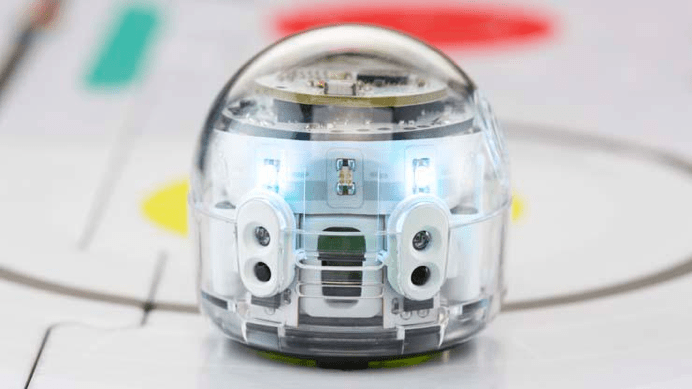
Ozobot is an educational robot that can be used to help students engage in constructivist learning in the classroom. Students program the Ozobot using ozoblockly, which is based on Google’s Blockly programming tool, to perform a number of different functions, ranging from simple tasks such as moving left and right, to more complicated functions such as making it dance and change colour.
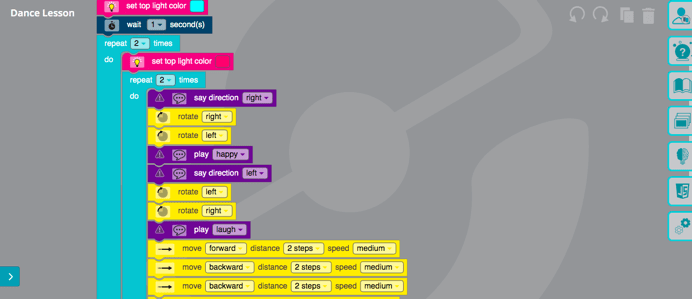
The Ozobot is an effective learning tool as not only does it help students develop their ICT skills, it also helps develop their computational thinking skills, engage in problem-based learning with a tangible result attached, creatively come up with solutions and work collaboratively in the classroom. An example of how the Ozobot could be used creatively in the classroom is by attaching a pencil to the Ozobot and programming its path to draw a picture.
Some drawbacks of the Ozobot is that it may not be sufficiently challenging for senior students in secondary school settings. It also requires explicit instruction and direction in order to get students skilled enough to use it to its full potential.
References:
- Alimisis, Dimitris (2012). Robotics in Education & Education in Robotics: Shifting Focus from Technology to Pedagogy. Robotics in Education Conference, 2012
- Jung, S., & Won, E. S. (2018). Systematic review of research trends in robotics education for young children. Sustainability, 10(4), 905
- Atmatzidou, S., & Demetriadis, S. (2016). Advancing students’ computational thinking skills through educational robotics: A study on age and gender relevant differences. Robotics and Autonomous Systems, 75(PB), 661-670.
 Joshua Moore's ePortfolio for EDUC3620
Hi Josh, I loved your idea of attaching a pencil to an Ozobot – what a great way to engage students! Perhaps for a stage 2 mathematics class, students could even code the Ozobot to draw different shapes, so that they would need to evaluate the angles and features of different shapes in order to code it accordingly. Do you know if Blockly code allows you to specify how many angles you want the Ozobot to turn?
LikeLike
Thanks for the comment Hayley!
Blockly code limits turning to only ‘left’, ‘slight left’, ‘right’ and ‘slight right’, which limits students to turning at either 45 or 90 degrees. Essentially, this means it is only useful for drawing simple shapes.
Josh
LikeLike
Hi Josh, well done on such an insightful blog post! I especially like your comment about students being co-constructors of their learning rather than passive receivers of knowledge. I agree that Ozobots may not be challenging for secondary school students. Perhaps Ozobots could be paired with a more complicated task such as encrypting code using your idea of attaching a pencil. Students could work in groups and have half the group make up a code and program the Ozobot, and the other half decrypt the code.
LikeLike
Good idea Nataliey! I wouldn’t have thought of that, just goes to show that the successful application of these technologies are in many ways only limited by your own creativity to come up with unique uses for them!
LikeLike